
Assistive Technology Toolbox
As mentioned in the Educational Toolbox, in our course 'Educational and Assistive Technology' we have comprised together a list of tools that would be used as 'Assistive tools' in the classroom or at home. These tools can assist individuals with reading, writing, seeing, hearing, information management and time management. Upon clicking the link you can see the different tools, divided into sections on my Pinterest account.

IN CLASS ASSIGNMENT: Assistive Technology Analysis
For a class assignment, we were asked to choose an Assistive tool to analysis and teach our classmates about. I choose the website/ app 'LucidChart'.
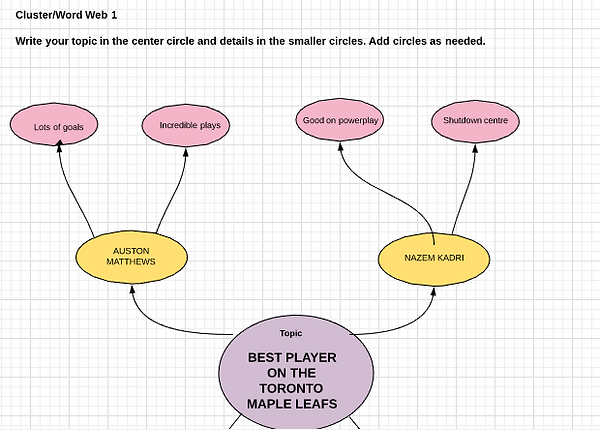
Figure 1: Venn diagram I created on LucidChart organizing winter words, clothing and winter clothing.

Figure 2: Word web I created mapping out the best players on the Toronto Maple Leafs with reasons why.
Tools for Information Management
1. Name of App/Extension/Software (A/E/S):
The name of the application is LucidChart. It is a tool for information management.
2. Rate A/E/S on a scale from 1-5:
I would rate LucidChart as a 4. I give this website this rating because it has a lot of great features. There are hundreds of templates for different types of graphic organizers (e.g. flowcharts, venn diagrams, mind-maps etc.). When creating these graphic organizers, you can use a template that is already set up with a theme or you can choose to customize it to how you like it. This is a good tool to manage a lot of information you may have into an easy flowchart. The reason why it didn’t get a 5 rating is because since it has so many features on the website, it got a bit challenging to navigate the website. This could lead to frustration with many users.
3. Describe briefly what the A/E/S does:
LucidChart is a website designed to create flowchart- online graphical organizers (LucidChart, 2017). This is a beneficial site as it can be used for basic brainstorming all the way to project management (LucidChart, 2017). Instead of creating plans or organizers on paper, this website allows you to create it online. It’s a great way to take a lot of information and make it into one graphical organizer. Having the ability to create graphic organizers online allows for them to be neat, saved (you can’t lose it), and shared amongst other very easily. In addition, many people can work on the same flowchart at once! This is great for businesses or school projects. When navigating the site, one would choose what type of graphical organizer they want to make; there are so many templates/categories to choose from. Once they have picked the type of organizer they want (e.g. Word Web), they can customize it and add their text/ colours and more to it.
4. Who would benefit from this A/E/S (Age and Grade, learning profile):
After exploring this site and creating some sample projects, I think this website, LucidChart is best intended for students grade 8 and above (ages 14+). I suggest this website for those 14 and above because it is a challenging website to navigate as there are so many options. This could get really confusing for individuals younger. This is a great website for visual learners that need to see their thoughts/ ideas mapped out. It is also great for anyone that has a lot of information that could be easily simplified and managed into a chart. There is a section called ‘Education’ where there are so many educational types of graphical organizers (e.g. venn diagrams, mind map, word webs, cause and effect, family tree) (LucidChart, 2017)
5. Would you recommend this A/E/S? Why or why not?
I would certainly recommend this website to students and others. I think it’s a great, easy way to create graphical organizers. It is super convenient since it can be done online. Most people if they create it on paper will probably lose it; but this saves it right as you do it. You can then download it on your computer. I also love the fact that multiple people can work on it at the same time. LucidChart (2017), is great with its number of features and templates. It would definitely be a website that I would recommend and start using myself.
References
LucidChart (2017). Lucid Software Inc. Retrieved from: